
A really useful information to have while debugging applications is an end-to-end request id.
To be able to achieve that you need not only NGINX but also application changes, to forward the ids but also to log them. On this post, I would like to share how to implement the NGINX side.
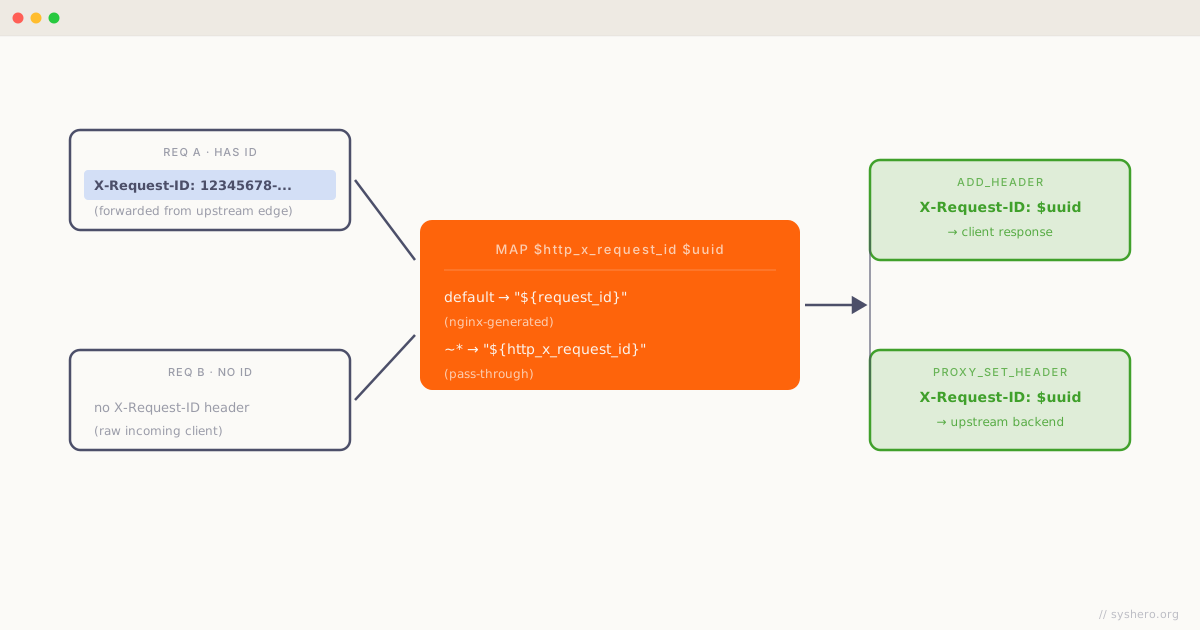
One way to achieve that is setting a header for both the client side and to the upstream called X-Request-ID for example.
The behavior expect is that, if X-Request-ID is set, NGINX will forward the same value to the next upstream, if the header is not set, NGINX will generate a random request identifier and add it to the request.
To achieve that we use a map configuration as can be seen in the following configuration.
map $http_x_request_id $uuid {
  default   "${request_id}";
  ~*        "${http_x_request_id}";
}

server {
  listen 80;
  server_name _;

  proxy_set_header X-Request-ID $uuid;
  add_header X-Request-ID $uuid;

  location / {
    proxy_pass http://backend.local;
  }
}
On my previous implementation, we used a Lua piece of code to generate the unique request identifier, and this had specific formatting similar to:
12345678-1234-1234-1234-1234
To guarantee backward compatibility, I used an NGINX map to format the $request_id variable to a format that matches my old setup.
map $request_id $formatted_id {
  "~*(?<p1>[0-9a-f]{8})(?<p2>[0-9a-f]{4})(?<p3>[0-9a-f]{4})(?<p4>[0-9a-f]{4})(?<p5>.*)$" "${p1}-${p2}-${p3}-${p4}-${p5}";
}

map $http_x_request_id $uuid {
  default   "${formatted_id}";
  ~*        "${http_x_request_id}";
}
Using map, you can apply regular expressions to variables and transform the variables based on the regular expression.
This is one of the many reasons why I think map is one of the most versatile and powerful configuration options for NGINX.
I hope this helps you!